


-

 Orders & Payments
-
Placing Orders
Placing OrdersHow do I apply a discount code?
If you are using a promotional code that is currently on our website this can be added in your ‘bag’. All you need to do is enter the promo code in the field under the ‘total’ order amount and then select ‘Apply’.
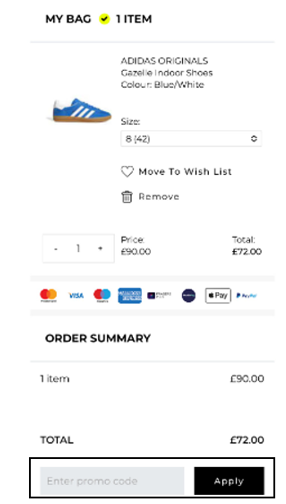
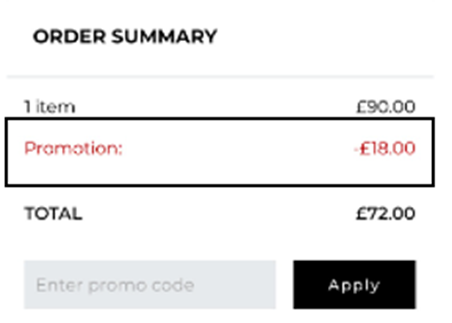
If your order meets the requirement for the code the discount will be applied to your order and will show in the ‘order summary’:
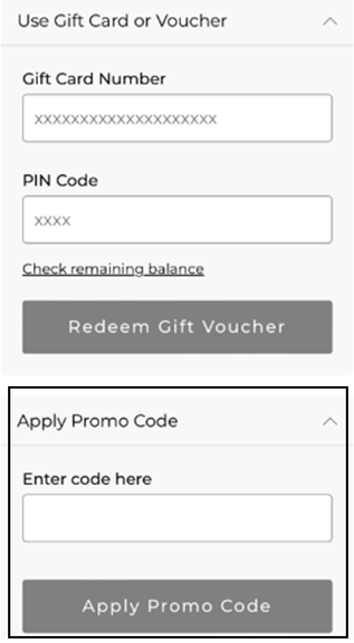
Any other codes need to be added in the payment section.
Some of our offer codes require you to be logged in to your account online to receive the discount. Please make sure you've logged in using the email address which you received your offer.
Once you’ve selected your delivery option, you will be presented with all the payment options available for your order. Select ‘Apply Promo Code’ enter the code provided to you and then select ‘Apply'.
Please note:
Terms and conditions apply to all our promotions and sales. There may be brands or departments that are excluded from our promotions. All promotions are subject to stock availability and promotional codes can no longer be honoured after their end date.
If you selected an item from the Outlet/Clearance category but are not seeing the expected discount during checkout.
Sadly, that item will not qualify for the promotion.
Βρήκατε αυτό το άρθρο χρήσιμο; Ναι 'Οχι
Στείλτε τα σχόλιά σαςΕυχαριστούμε για τα σχόλιά σας.
Αν θέλετε να μας δώσετε περισσότερες λεπτομέρειες για το πώς μπορούμε να βελτιώσουμε αυτό το περιεχόμενο, μπορείτε να μοιραστείτε συγκεκριμένα σχόλια με τον συγγραφέα του άρθρου παρακάτω.
Σημείωση: Αυτή η ανατροφοδότηση ΔΕΝ σας συνδέει με την ομάδα Εξυπηρέτησης Πελατών. Εάν θέλετε να επικοινωνήσετε μαζί μας, πατήστε το κουμπί «Ακύρωση» παρακάτω και, στη συνέχεια, πατήστε «Επικοινωνήστε μαζί μας» και ακολουθήστε τα βήματα.
-
Placing Orders