


-

 Orders & Payments
-
Placing Orders
Placing OrdersHow do I check the balance on my Gift Card or eVoucher?
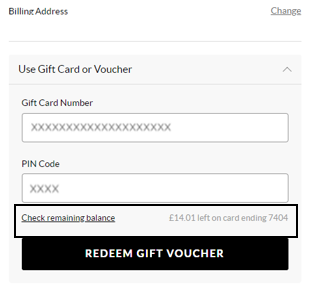
To view your balance on a Gift card or eVoucher you will need to add your items to the basket first and then once you've selected your delivery option you will be taken to the payment section. You will be presented with all the payment options available for your order. Select ‘Use Gift Card or eVoucher’ and enter your eVoucher/credit note code and pin number and then select ‘Check remaining balance’, you will then be able to see your balance.
Βρήκατε αυτό το άρθρο χρήσιμο; Ναι 'Οχι
Στείλτε τα σχόλιά σαςΕυχαριστούμε για τα σχόλιά σας.
Αν θέλετε να μας δώσετε περισσότερες λεπτομέρειες για το πώς μπορούμε να βελτιώσουμε αυτό το περιεχόμενο, μπορείτε να μοιραστείτε συγκεκριμένα σχόλια με τον συγγραφέα του άρθρου παρακάτω.
Σημείωση: Αυτή η ανατροφοδότηση ΔΕΝ σας συνδέει με την ομάδα Εξυπηρέτησης Πελατών. Εάν θέλετε να επικοινωνήσετε μαζί μας, πατήστε το κουμπί «Ακύρωση» παρακάτω και, στη συνέχεια, πατήστε «Επικοινωνήστε μαζί μας» και ακολουθήστε τα βήματα.
-
Placing Orders